How to Turn 1 Reference Video Ad into 20+ High-Converting Variations: Hooks, Products & Scenes
Nov 17, 2026 · David Matamoros · Commercial AI Director · 8 min read
To create 20 or more video ad variations without booking a reshoot, start with one proven reference ad and change one layer at a time: 1 Reference Ad × 5 Opening Hooks × 4 Product, Character, or Scene Swaps = 20 Ad Variations. Instead of generating twenty disconnected AI clips from scratch, you preserve the camera pacing, physical action, and timing that already convert while systematically swapping hooks, SKUs, cast, and campaign settings.
If your growth team runs paid social on Meta, TikTok, or YouTube Shorts, creative fatigue usually burns through a winning ad within a single week. Below is how reference-led ad multiplication works in practice on AdMultiplier, the exact file rules and underlying motion engines involved, production prompts you can copy for each swap layer, where automated variations still break down, and what a 20-ad test batch actually costs in credits.
What kind of ad variations can you create from one master clip?
One approved video creative already contains the hardest part of performance marketing to fake: natural human pacing, believable product handling, and proven cut rhythm. Keeping that motion spine intact lets your team isolate individual variables so media buyers know why Version B beat Version A:
| Variation Layer | What Changes in the Frame | What Stays Locked |
|---|---|---|
| 01 / Opening Hook Variations | The first 2–3 seconds of visual action or spoken hook line | Core product demo, pacing, and end-card structure |
| 02 / Product Swap | New SKU shade, packaging colorway, seasonal flavor, or companion item | Camera movement, hand interaction timing, and room lighting |
| 03 / Character & Outfit Swap | Spokesperson identity and wardrobe adapted to new buyer demographics | Original body gesture, framing, and delivery cadence |
| 04 / Background Replacement | Indoor bathroom swapped for sunlit pool deck, café window, or winter street | Foreground subject, product silhouette, and camera trajectory |
| 05 / Offer & Call to Action (CTA) | Closing hook/offer ("Get 10% off" vs. "See all three shades") | Preceding visual demonstration and scene continuity |
Combining 1 master clip into 5 opening hook variants, then applying 4 targeted product or audience-setting swaps to each hook produces 20 distinct testable ads (1 -> 5 -> 20) — and adding just two localized voice/lip-sync dubs scales the matrix to 60 deliverables without stepping back into a studio.
How does reference-led ad remixing work on AdMultiplier?
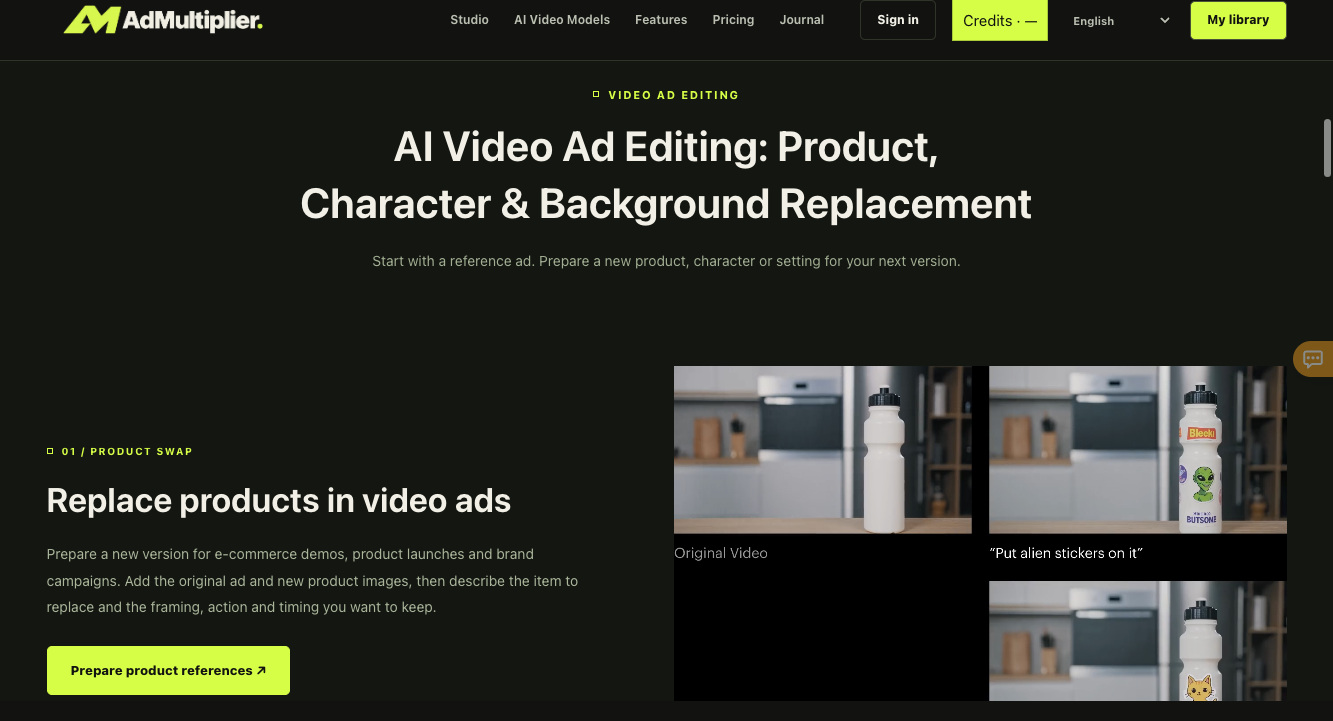
Inside the AdMultiplier Video Studio, every variation starts from two concrete inputs — a motion reference video (MP4 or MOV, 3 to 30 seconds) and a character or product reference image (JPG or PNG) — routed through selectable motion-control and generation backbones including Kling 2.6 Motion Control, Kling 3.0 Motion Control, Kling 4.0, Seedance 2.0 Mini, and PixVerse V6 Max.
Source: AdMultiplier Video Ad Editing Studio
Before uploading assets, match your source files to the studio's documented input boundaries so jobs never fail validation mid-batch:
| Reference / Output Parameter | Supported Format | Live Studio Requirement |
|---|---|---|
| Motion Reference Video | MP4 / MOV | 1 video clip, 3–30 seconds, up to 100 MB max (trim longer ads first) |
| Character / Product Image | JPG / PNG | 1 clear, unobstructed reference image, up to 10 MB max |
| Character Orientation Ceiling | Video or Image mode | Video orientation: up to 30 s · Image orientation: up to 10 s |
| Output Resolution | 720p or 1080p | Select before generating; credit quote displays upfront before submission |
| Selectable Studio Engines | Multi-model router | Kling 2.6 / 3.0 Motion Control, Kling 4.0, Seedance 2.0 Mini, PixVerse V6 Max |
Step 1 — How do you replace products without breaking hand or table physics?
Once you have a clean 6-to-15-second master demo clip, 01 / Product Swap replaces the hero item using your uploaded product image while preserving the original camera push, tabletop shadows, and hand timing.
What it does: Adapts one proven demonstration into multiple SKU shades, scents, or seasonal editions — anti-failure & credit-saving rule: only swap products that share similar bounding-box proportions and grip geometry (for example, swapping one cylindrical water bottle or lipstick tube for another). Replacing a tall slim bottle with a wide flat cosmetic jar forces unnatural finger clipping and wastes credits.
PRODUCT SWAP — STUDIO BRIEF PROMPT (ATTACH @reference_ad.mp4 + @new_sku.png):
Recreate the reference ad motion, camera framing, and tabletop timing exactly as shown in the source video. Replace the original plain white bottle on the kitchen counter with the branded insulated bottle from the reference image, keeping the exact vertical silhouette, cap height, natural kitchen window reflections, and background depth of field unchanged.
Step 2 — How do you swap characters, outfits, and campaign backgrounds one variable at a time?
Testing whether a different creator demographic or seasonal backdrop lifts thumb-stop rate works only if the underlying performance does not change simultaneously. Run 02 / Character Swap and 03 / Background Replacement as separate controlled passes rather than rewriting everything at once.
What it does: Transfers the proven gesture, pacing, and camera rhythm of your reference clip onto a new cast member (Character + Outfit Swap) or transports the exact same performance from an indoor counter to an outdoor summer setting (Background Replacement).
CHARACTER & OUTFIT SWAP PROMPT (KEEP PERFORMANCE + CHANGE CAST):
Preserve the exact body movement, hand gesture, eye-line timing, and camera pacing from the motion reference clip. Replace the original presenter with the woman in the uploaded character image wearing a relaxed oatmeal linen blazer and gold hoop earrings. Keep indoor daylight framing and product handling identical.

BACKGROUND REPLACEMENT PROMPT (KEEP SUBJECT & ACTION + CHANGE SETTING):
Preserve the presenter, outfit, product demonstration, and camera framing from the reference video without altering facial expression or hand movement. Replace the indoor studio backdrop with a sunlit Mediterranean café window seat at golden hour, warm natural rim light on shoulders, soft street bokeh outside the glass.
Step 3 — Which underlying video engine should you select for motion vs. budget?
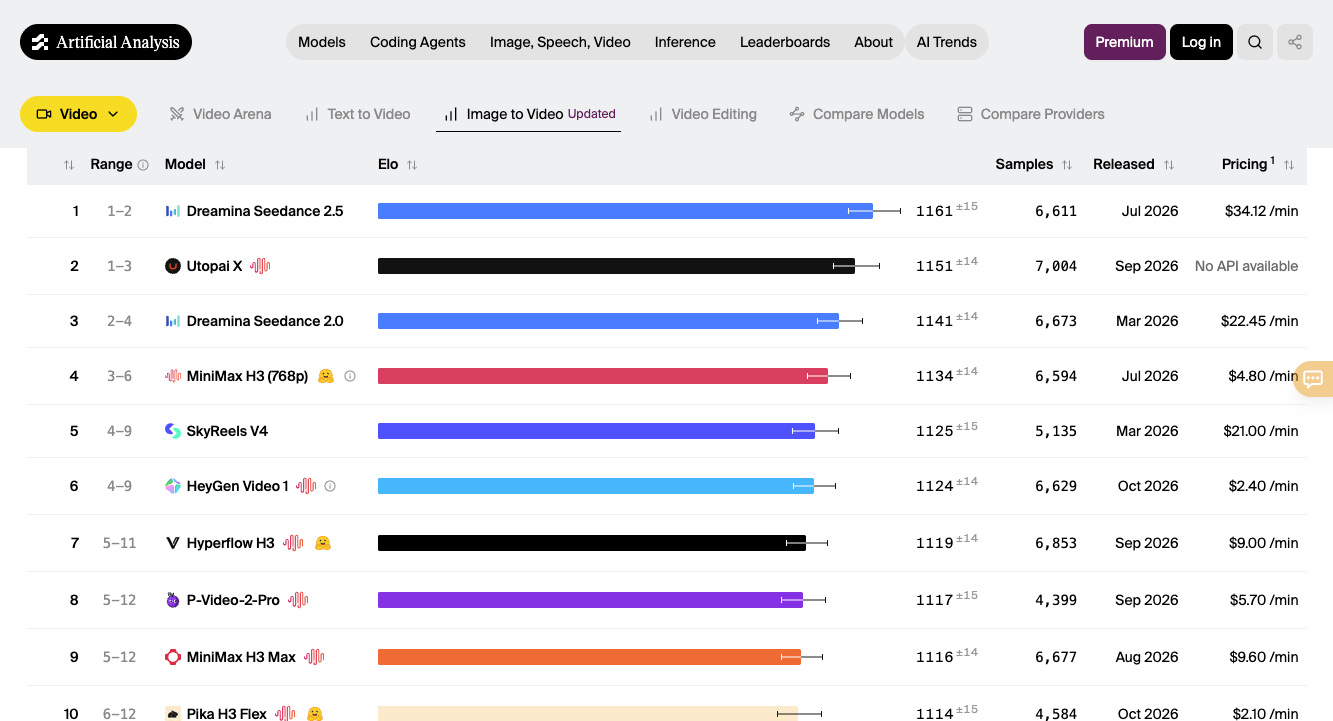
Because AdMultiplier exposes five distinct video engines inside the studio dropdown, picking the right backbone per stage keeps both visual stability and credit spend under control. On the live Artificial Analysis Image-to-Video Leaderboard (AA-Video-I2V v2.1), Seedance 2.0 holds Rank #3 globally at 1,141 Elo (6,673 blind human votes, right behind flagship Seedance 2.5 at 1,161 Elo), while the Kling family anchors precise motion-control transfer and PixVerse V6 covers low-cost social experiments ($6.90/min API baseline).
Source: Artificial Analysis Image-to-Video Leaderboard (AA-Video-I2V v2.1)
- Use
Seedance 2.0 Minifor rapid hook & scene scouting: Fast, stable image-conditioned motion ideal for testing five opening hook concepts at720pbefore scaling spend. - Use
Kling 2.6 / 3.0 Motion Controlfor strict gesture & presenter transfer: Best when locking a spokesperson's exact head turn, hand demonstration, and pacing across3–30sreference clips. - Use
Kling 4.0for flagship1080phero variations: Strongest choice once an opening hook and SKU combination prove high click-through rate and graduate to high-budget Meta/TikTok scaling.
Where automated ad variations fall short, honestly:
Reference-led ad remixing removes 80% of physical reshoot friction, yet four real-world production limits still require human quality checks before you push variations live into ad manager:
- Small packaging typography and ingredient labels: Curved bottle text under
10pt, barcodes, and fine regulatory marks can soften or warp during motion transfer — always inspect logos at100%zoom in My creations, and overlay crisp vector brand badges in Premiere or CapCut when needed. - 10-second cap on Image-orientation mode: While Video character orientation supports full
3–30 secondmotion clips, Image orientation mode caps output at 10 seconds; structure static-anchor social hooks around tight 6-to-10-second beats. - Drastic product geometry mismatches: Swapping a handheld spray bottle for a two-handed heavy appliance breaks hand-contact physics immediately. Film one master reference clip per packaging form factor.
- Audio & voiceover rights and lip-sync review: Changing an opening hook line or localizing into new languages requires checking pronunciation, lip alignment, and explicit likeness/voice consent. Never clone or remix a creator's likeness or voice without documented permission.
How much does a 20-variation campaign batch actually cost in credits?
AdMultiplier displays an exact credit quote on the Generate video button before every submission, anchored to motion reference duration and output resolution. Live studio telemetry lists 720p generation at 22 credits per second of motion video duration. On /pricing, annual plans convert at $0.0124 per credit on Basic ($226.80/yr for 18,240 credits), $0.0104 per credit on Pro ($294.00/yr for 28,200 credits, including +3,678 bonus credits), and $0.0058 per credit on Enterprise ($1,188.00/yr for 203,760 credits, including +58,217 bonus credits):
| Campaign Production Task | Duration & Tier | Credit Math (720p @ 22 credits/s) | Credits Used | Effective Cost (Pro Yearly) |
|---|---|---|---|---|
| Single 6s Opening Hook Test | 6s motion ref · 720p | 22 credits/s × 6s | 132 credits | ~$1.38 |
| Single 10s Product / Cast Variation | 10s motion ref · 720p | 22 credits/s × 10s | 220 credits | ~$2.29 |
| 5-Hook × 4-Variant Matrix (20 Ads, 6s) | 20 × 6s social cuts · 720p | 20 × 132 credits (1.0x pass) | 2,640 credits | ~$27.52 |
| 20-Ad Matrix incl. 1.25x Studio Re-Rolls | 25 total runs (20 approved 6s ads) | 25 × 132 credits | 3,300 credits | ~$34.40 (~$1.72 / approved ad) |
Insider budget rule: Do not render 30-second 1080p masters when testing cold hooks. Run your 20-variant matrix as punchy 6-to-8-second 720p variations (132–176 credits each) to identify the top two thumb-stop winners on a $35 credit budget, then spend 1080p credits exclusively on the winning creative.
Got any questions left?
What happens if my original winning video ad is longer than 30 seconds?
AdMultiplier accepts motion reference clips between 3 and 30 seconds (MP4 or MOV, up to 100 MB). If your winning UGC ad runs 45 seconds, trim out the first 6-to-10-second hook + product reveal segment in any editor, multiply twenty variations of that opening segment, and splice them cleanly onto your existing approved body footage.
Should you swap the character, product, and background all in the same run?
You can brief all three in one prompt for a complete creative reboot, yet performance marketers get far cleaner attribution by changing one variable per batch — for example, holding the spokesperson and script fixed while testing four product colorways, then testing three new settings on the winning SKU.
Are video downloads watermarked or charged extra credits?
No — credit quotes apply strictly to generation tasks. Reviewing saved renders inside My creations and downloading approved 720p or 1080p video files carry zero extra download fees.
What pre-flight quality checks should you run before launching variations in Meta Ads?
Play every exported clip start to finish and verify four non-negotiables: packaging logos and claims remain accurate, hands grip the product without finger clipping, captions and CTAs sit inside 9:16 platform safe zones, and you hold written permission for every human likeness, product asset, and audio track used.


Comments
Post a Comment